Crystal Hammer
2015-22,25 Websites 🌎
WordPress, CMS, HTML, CSS, PHP
⏱️Overview
Here I gather my experiences with developing websites.
Both this one, using WordPress and the old one for Stunt Rally using CMS Made Simple. Both are PHP based and allow customization with CSS, HTML and PHP code.
I also list used WordPress plugins old and new, which are essential to me.
Host
They were free hosted on TuxFamily since 2015 until 2025. For which I am very thankful. No cost was very important for me. But there were outages few times a year for few days.
Since forum topic in end 2024 confirmed it’s dying and won’t get better, I decided to look for a free alternative.
Well codeberg pages is one, it’s FOSS, but only for static HTML pages.
Then in early 2025 I decided for paid host and web domain. Now only using WordPress for both my website and Stunt Rally’s. Thus their urls changed.
🚀Stunt Rally website
📜History
It was released in May 2015. So 5 years later after my first game release in Apr 2010. Way too long probably. We had forum earlier, since Nov 2012, a bit late too.
The website was started and put together by alket and finished by me. There were like 2 attempts earlier too.
The deciding factor was finding TuxFamily (hosting without cost for CC and FOSS projects).
Since I wanted to have a website, but didn’t want to pay for anything (neither hosting nor domain).
Once we had a place, it was a matter of someone with experience creating the website. I had none yet, and at the time I was still very busy (developing, improving art, tracks) and didn’t want yet another distraction from that. But once I saw alket having put it together, I decided to style it and finish everything. It was also a nice learning experience.
📊Features
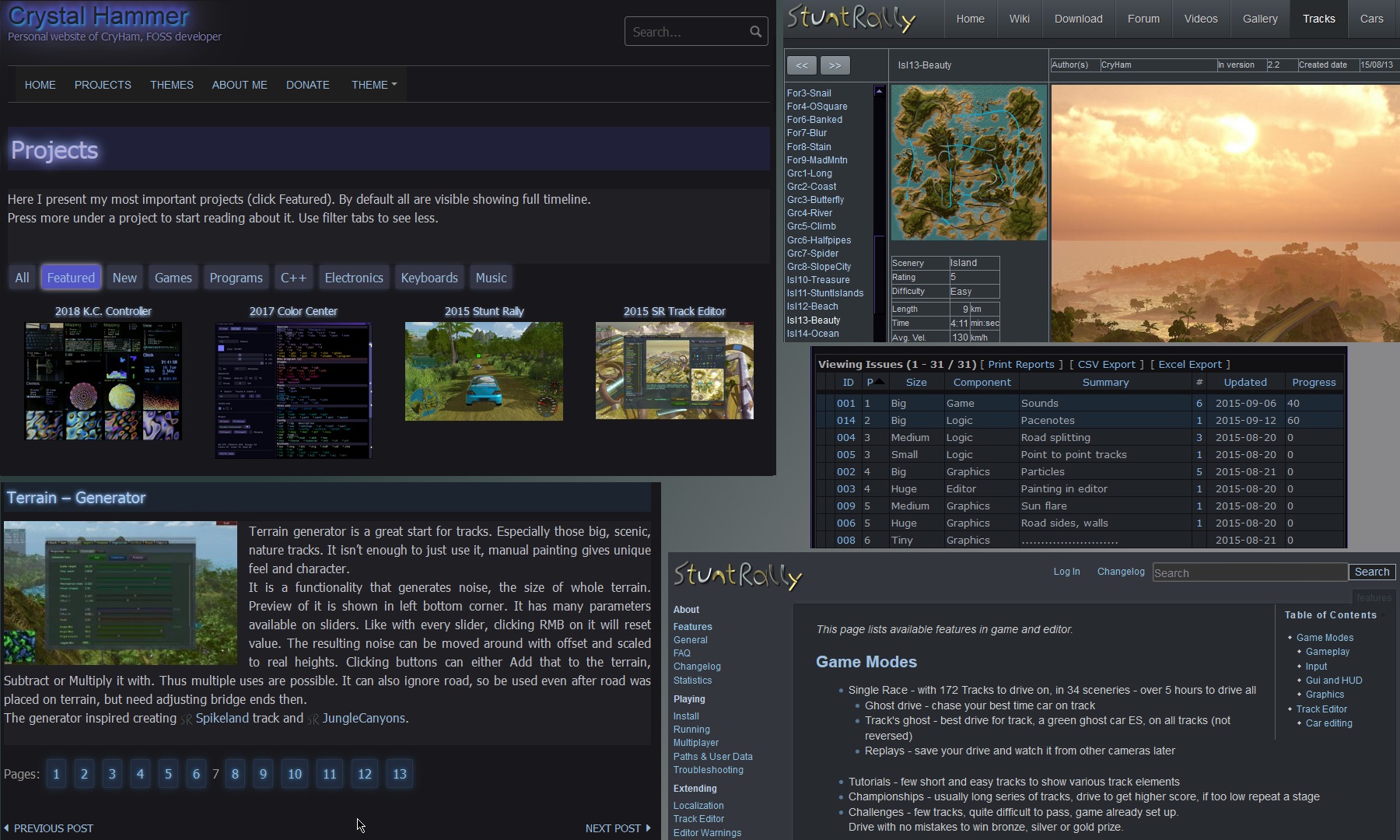
We used CMS Made Simple because it allows for more customization using templates and global content blocks.
I wanted to have our tracks and vehicle browsers, which I once wrote using just HTML and JS. Nice small functional code, displaying images from github and statistics from XML files.
But it is not FOSS, so I can’t recommend it and I will change to something else.
We use DokuWiki for documentation. It is nice, not too big (like MediaWiki) and stores pages in text files not database. Editing pages is also good from what I remember.
We also had a gallery nanoGallery3, it’s broken now. Since I’ve put a lot of screenshots (about 120 each release) and also same amount of development screenshots (total 1.8 GB, about 4200) on Picasa (Google Photos now), I wanted just a plugin that would display it. Worked well for few years.
I also wanted a nice issue management for ToDo (sadly just my tasks at the time, I was again developing alone).
It wasn’t probably that needed after all, but we installed Mantis BT (I used it before) and I customized it to my liking. Seems that it still can’t sort by priority on at start view, which I’d like.
🎇2025
These were the features of SR website at its best times, with own Wiki and Mantis issues there. At first used by few, then for long by me only, until finally not needed anymore.
Probably only missing forum there too, to complete all cases. But that would mean much more trouble.
I decided to convert wiki to markdown and put it just inside our git repo docs. Markdown gets formatted while browsed there. Sure it’s not best since users have to see that github interface too when reading documentation, it’s slow and not FOSS too. But easy to edit in VSCodium with its preview mode. And all docs come in this form in docs folder with release and so can be read offline too.
Then I moved away from TuxFamily. Its php hasn’t been updated since years, it was dying (old hardware and software) and was unreliable due to noticeable outages. I bought a domain and paid hosting for my website and decided to simply put SR website inside of it, also just using WordPress. Not buying 2nd domain or making 2 WordPress setups. I think cryham.org/stuntrally/ is fine, after all it’s mainly my project. The track and vehicle online browsers needed JS code to work, and this turned possible to do. So new SR website has the same functionalities, just different look. And it is more FOSS, that CMSMS wasn’t and was just an old choice at that time.
🔨My website
📜History
It was released in Aug 2016 (if I remember), so more than 1 year later than SR’s website.
After some experience with CMSMS for Stunt Rally I thought of making my own website and gathering my other projects on it.
Someone recommended WordPress for it and I like it (is also the most popular).
Probably my favorites features in it are that:
- it auto updates itself,
- allows installing and browsing plugins and themes directly in it,
- and lastly the vast number of available plugins and themes available.
I still like using it today. But I think it’d be best to have a static html page (probably done with Grav), or at least a static copy from WordPress, as an alternative, e.g. on codeberg.pages.
⚙️WordPress plugins
Naturally it wouldn’t be that great without plugins (just like my Firefox).
Here is a list of plugins I used back then and what for:
Old – 2015
These were used since long ago, for earlier WordPress and old PHP in TuxFamily.
- Advanced Content Pagination
To split longer posts into pages. Page breaks added manually where I want them. - Broken Link Checker
Nice tool for automatic checking of website links, for wrong urls etc. - Child Theme Wizard
For creating a child theme and letting me apply changes (in CSS and also PHP).
When original theme gets updated, my changes will stay independently. - Classic Editor
Restores the older post editor. - Collapse-O-Matic
For those blocks you can expand (dynamic show/hide). Adds a shortcode for wrapping content. - Favicon Links (old)
Adds those website icons before all links here. - Favicon XT-Manager
To have my icon for website. Displayed before page’s title on a browser tab. - FooGallery (not using yet)
For creating galleries in posts. - Native Emoji (old) – was really cool
Used for emoji and to add images for sections almost everywhere. Adds a drop down menu in editor. - Nimble Portfolio (old)
For the gallery in projects, with dynamic filters. I had some issues but now it’s good. - TablePress
For creating, editing tables and adding them in posts. - Table of Contents Plus
To auto create those blocks at start with contents, from headings. Also dynamic, like expand blocks. - Theme Switcha
To allow theme switching.
🎆New – 2025
These I currently use on this website.
| Adminify – White Label, Admin Menu Editor, Login Customizer | Customize the WordPress admin area with white-label branding, a drag-and-drop menu editor, login customizer, media folders, and security tools. | By Liton Arefin | Docs | Video Tutorials |
| Child Theme Wizard | Creates a child theme from any theme you have installed. | By Jay Versluis | |
| Conditional Menus | Enables you to set conditional menus per posts, pages, categories, archive pages, etc. | By Themify | |
| Darkify | Stylish, modern darkmode look. | By ThemeAtelier | Demo |
| DarkMySite | Simplest way to enable dark mode on your website. | By DarkMySite | Demo |
| Disable auto-update Email Notifications | Performs a simple task of disabling email notifications that are sent by WordPress when a plugin or theme auto-updates. | By Prem Tiwari | |
| Favicon by RealFaviconGenerator | Create and install your favicon for all platforms. | By Philippe Bernard | |
| FileBird Lite | Organize thousands of WordPress media files into folders / categories at ease. | By Ninja Team | Documentation |
| Radius Portfolio – Filterable Grid, Gallery & Slider Portfolio | Portfolio plugin with filterable gallery, grid, isotope & slider layouts. | By RadiusTheme | Demo | Documentation |
| Simple Custom CSS and JS | Easily add Custom CSS or JS to your website with an awesome editor. | By SilkyPress | |
| Simply Static (off) | A static site generator to create fast and secure static versions of your WordPress website. | By Patrick Posner | Docs |
| Table of Contents Plus | A powerful yet user friendly plugin that automatically creates a table of contents. | By Syed Balkhi | |
| TablePress | Embed beautiful and interactive tables into your WordPress website’s posts and pages | By Tobias Bäthge | FAQ | Documentation |
| Theme Switcha (off) | Theme switching done right. | By Jeff Starr | |
| WP Fastest Cache (off) | The simplest and fastest WP Cache system | By Emre Vona | |
| WPCode Lite | Easily add code snippets in WordPress. Insert scripts to the header and footer, add PHP code, custom content, and more. | By WPCode | |
👁️Observations
I am only using free versions and I prefer as always FOSS. I really dislike that commercial aspect of WordPress where most of stuff is just free beer. Meaning free to check out, but available to make you addicted and pay for better versions. Or see a lot of commercials or reminders in the free version.
I noticed few types of plugins (just like software):
- Few big ones, very popular and existing for years.
- Many abandoned, even when they were paid.
- Good ones, that aren’t popular.
- Few unpopular, and actually offering less, than the big ones that are open source.
- And rare but my favorite type, those that are Open Source (e.g. TablePress) or turned into.
There were (of course) many moments when I found something annoying, wanted more features, or browsed those endless plugins and couldn’t find any good, free one.
But I’m glad I achieved all what I wanted. E.g. recently allowing users to switch themes.
Since my default is dark, and some prefer white. I simply view every website in my dark theme, but I’m guessing most users can’t, especially on a stupid/smartphone in sunlight.
I also installed a style to have dark admin theme. Then customized few colors for syntax and editor. Now I can view my website in original theme and have WordPress also dark. Before, editor had white background, freaking annoying.
⌛Summary
I summarize it so:
CMSMS is quite low level, you need to know HTML, a bit PHP and probably for more users with hierarchy. From what I saw, it has to be updated manually. And it’s not FOSS, so a nope here, not recommended at all.
WordPress is easier to use, nice to edit, and very popular (perhaps too much). And with plugins can even have dynamic elements or most other need features.
Huge plus is updates itself. But it is rather big and heavy to use, compared to just static pages editing.
It doesn’t do much without plugins. For me some are essential and required at start already.
But it can also be not fully FOSS, depending on plugins used. And using only FOSS ones would limit it severely.
There is also Joomla, I just quickly looked at, and it seems to me to be more for a platform of users to collaborate, very social. Next is Drupal and there are way more on wikipedia CMS list.
Grav is a FOSS, simple file based web platform. Help and info in their docs. An example page for Speed Dreams FOSS game and its repo with Grav.
Lastly the most freedom giving way is just by using only HTML and CSS, without any JS. I think it’s how stallman.org is made.